Content Ingredients
Keyword library, knowledge base, media library, glossary, and brand profile — the raw material that decides generation quality.
Generation quality is decided by ingredient quality. GeoAns keeps ingredients in five places, all under "Assets" in the left menu.
Keyword library
Keywords feed topic selection. The "keyword extraction" card at the top of the page offers several ways to import them:
| Source | Use |
|---|---|
| Peer sites | Extract topic directions from competitors' sites |
| Keyword expansion | Grow long-tail question words from seed words |
| Industry extraction | Batch-extract common questions and demand words for an industry |
| Manual upload | Import your own words from a template |
A "question combination" entry is also available — see the page for what is currently offered.
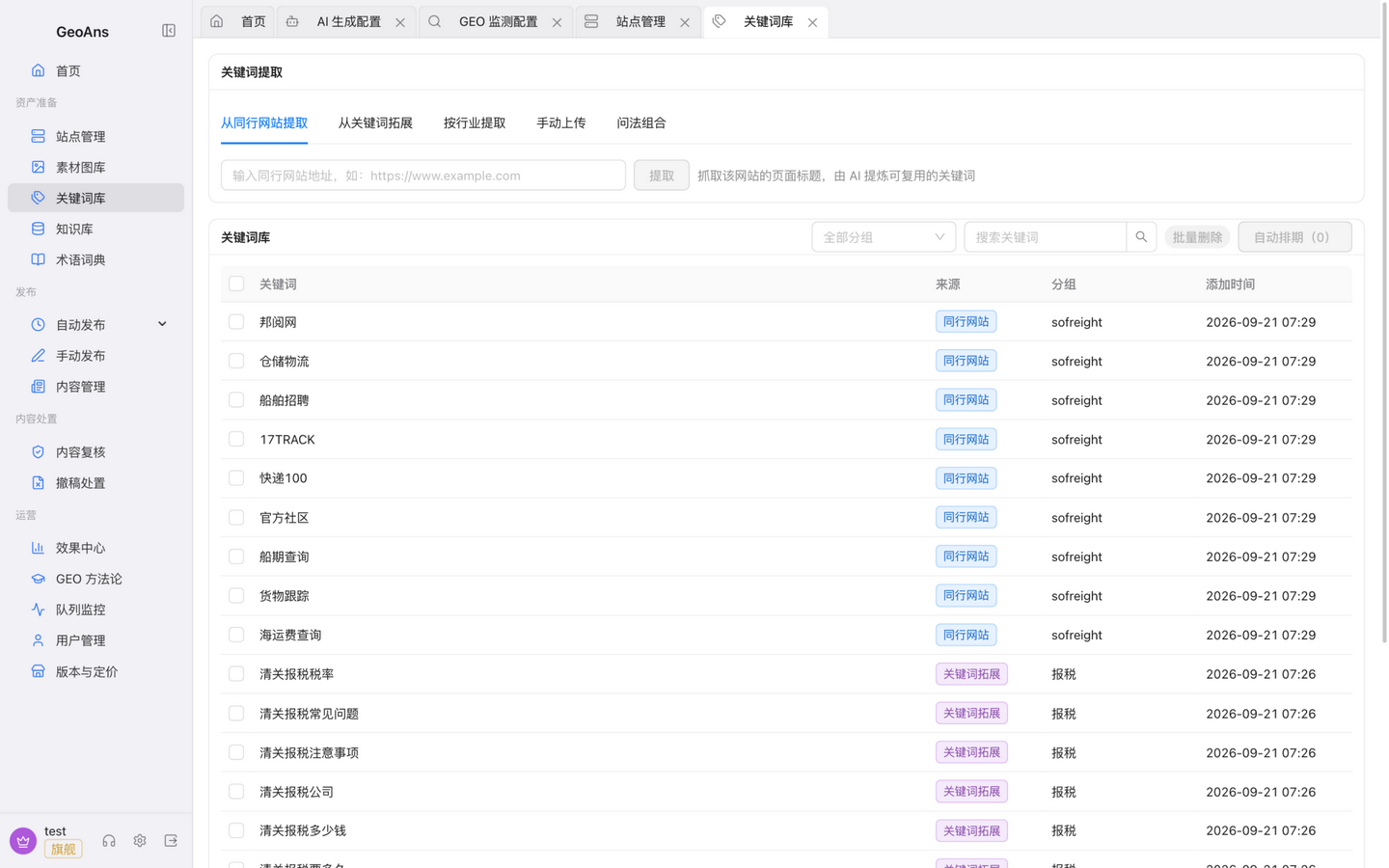
Give priority to buyer-intent words ("which supplier is reliable for X", "how to choose X") — they are the questions customers really ask AI, and the same material as the "customer questions" used in monitoring.
Knowledge base
The knowledge base is the reference material generation draws on. Three ways in:
- Upload: product documents, technical docs, cases, and similar files;
- Web ingestion: after verifying your own domain, have the platform crawl pages of your own website — emails, phone numbers, and other contact details in crawled content are automatically masked;
- AI industry knowledge: let AI draft industry knowledge for your vertical. These entries are AI-generated and take effect only after you confirm each one — verify them before confirming.
Entries carry states such as "pending / parsing / active / awaiting confirmation / failed / disabled"; only "active" entries are used in generation.
Media library
Upload product photos, case images, and other assets — this is the first source for plan imagery: a publishing plan matches the media library by keyword by default and falls back to your licensed image provider when nothing matches (see "Configure AI Capabilities").
The library supports:
- Size settings at upload time; assets are processed accordingly, and publishing consumes the processed result;
- Watermarks: on/off, position, scale, and watermark image;
- Stock-provider images carry provenance info with source and licensing;
- A single asset can be distributed to a site's media library, with retry on failure;
- Assets consume your plan's media storage quota and can be deleted at any time.
Glossary
Record the canonical spelling of brand names, product names, and technical terms (including translations) so generated content never contradicts itself.
Brand profile
Maintain your brand name, aliases, cases, credentials, and scale under "Settings → AI Configuration → Brand profile". It is the factual basis for how AI describes your brand and the yardstick for effect statistics — keep it up to date as the business changes.
With ingredients ready, head to "Generate & Publish" for your first plan.