Connect Your Site
Bind your WordPress site with the contract-v2 plugin — address, token, categories, and publishing mode.
GeoAns publishes only to sites you own and control (currently WordPress and other sites with the GeoAns site plugin installed) — that boundary is what keeps content safe. Connect under "Assets → Site Management" in the left menu.
Prerequisites
- A WordPress site you administer;
- The GeoAns site plugin (contract v2) installed and enabled — the plugin receives the content the platform publishes and updates.
Adding a site
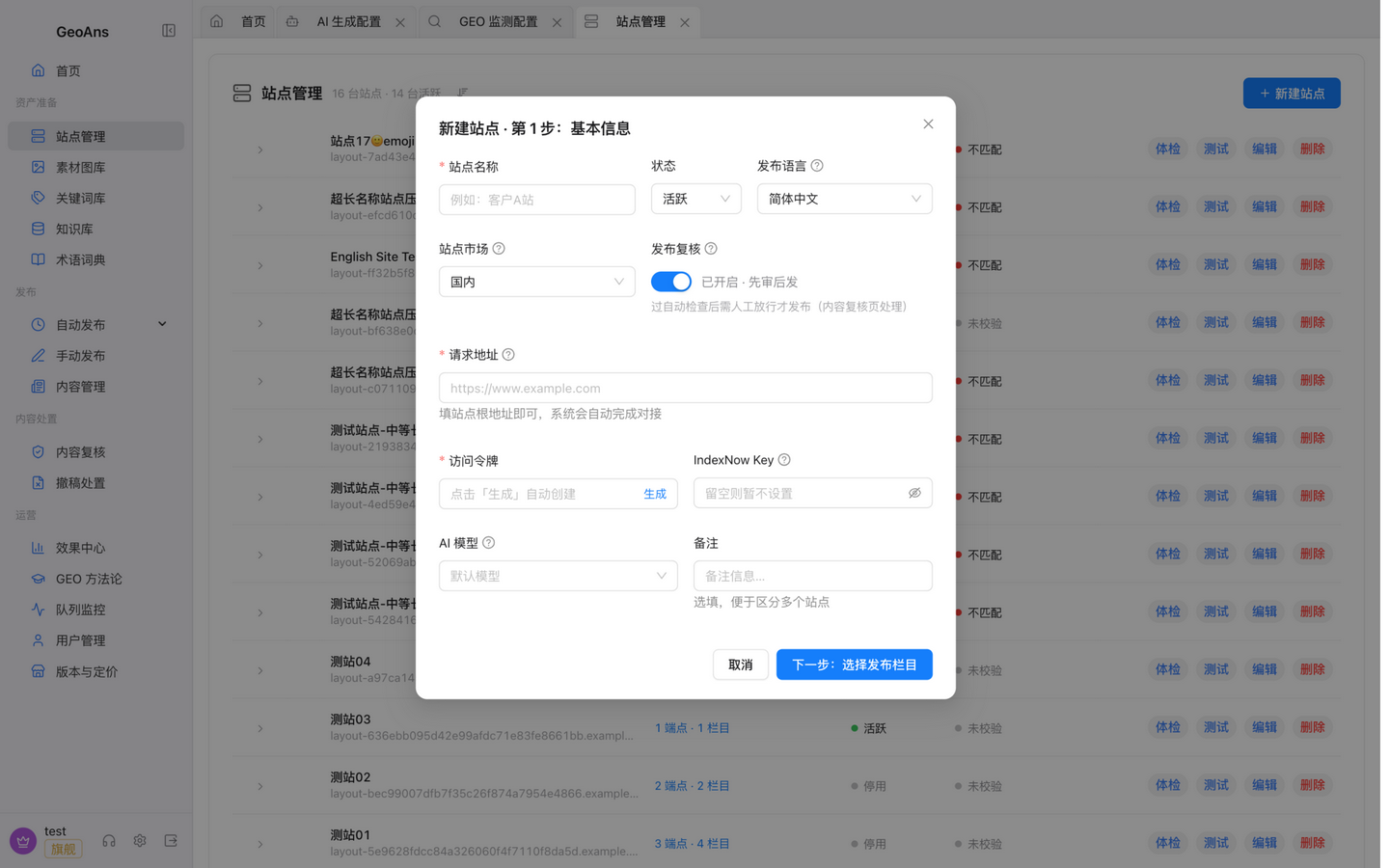
In "Site Management" click add and fill in:
- Site address: your site's home URL is enough — the system detects automatically whether the plugin is ready;
- Access token: click "Generate" for a random token of at least 32 characters and copy it into the plugin settings — the token is the credential the platform uses to publish to your site, so keep it safe;
- IndexNow key: lets search engines be notified for faster indexing after publishing (optional).
After saving, watch the site health state: unchecked → verified is normal; "mismatch" usually means the token wasn't synced or the plugin is outdated — re-sync the token.
Categories
Open the site detail and bind publishing categories: content is published to the categories you choose, and each category can carry its own content direction. When creating a site you can also pick a publishing language (Simplified Chinese by default) — multilingual teams can create one site per language.
Site check-up
Run a "check-up" on any site from the list — it tests whether AI crawlers can reach your site:
- Whether search-engine and AI-crawler robots rules allow access;
- Whether the article body is readable;
- Whether URLs are canonical.
If published content is slow to get indexed, run a check-up first — the blocker is usually a crawler rule or URL canonicalization on the site side.
Market & publishing mode
Each site chooses a target market, which decides the default publishing mode:
| Market | Default mode | Notes |
|---|---|---|
| Domestic (China) | Review first | Generated content waits in the "content review" queue and is published after a human passes it; serving the domestic market requires a separately signed private-deployment agreement |
| Cross-border | Automatic | Published on schedule; review can be turned on per site |
The mode can be switched per site. For sites with review on, watch the "content review" step in "Generate & Publish" — plans pause at human review until you pass or reject them.
Per-site model binding (optional)
To give a specific site a different model, bind one in the site detail; sites without a binding use the model library default.
Self-developed site?
Teams integrating a self-developed website instead of the official WordPress plugin implement the platform's interfaces themselves (connectivity, categories, publishing, updating, deletion, images, export, etc.). The full contract and request examples are in the appendix "Site Plugin Contract".
Once connected, move on to "Content Ingredients" to prepare keywords and the knowledge base.